The Cloud Server environment allows you to customize resources individually, including virtual processors, memory, and storage space. A restart is required to make changes to processors and memory. Storage space can be expanded in 50GB increments, while the system disk remains unchangeable. The qemu-guest-agent and the "discard" option are important for storage space calculation and data backup. Additional IP addresses can be added and must be configured manually. Management is done through the management interface, where the MAC addresses of the IPs are also viewable.
General
Cloud Server Root: Starting and Stopping the System
Cloud Server Root: Adjusting Storage Space
Cloud Server Root: qemu-guest-agent and discard.
Cloud Server Root: Adding Additional IP Addresses
General
The Cloud Server environment allows you to customize resources according to your preferences. The available number of virtual processors, memory, and available storage space can be adjusted at any time. Additional IP addresses can also be added.
A restart of the system is necessary to adjust the virtual processors and memory. We will perform this restart immediately after the order. Please inform us if you would like this to be scheduled.
Simply send us a request via the "Order Options" form or through the Support Form.
For Cloud Server Root systems, please note the information below.
Cloud Server Root: Starting and Stopping the System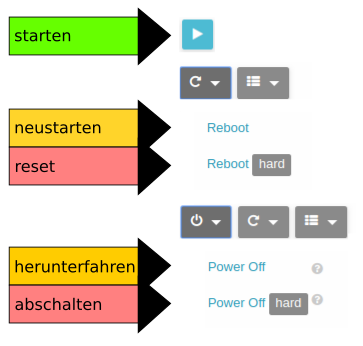
Cloud Server Root: Adjusting Storage Space
Cloud Server systems are generally delivered with a system disk and a data disk. The system disk is always 10 GB in size and cannot be expanded. The data disk has the size specified in the order and is mounted as /var upon delivery.
If you need more storage space, we can expand the existing data disk in 50GB increments.
Afterward, you can enlarge the filesystem on it using the operating system's tools (resize2fs, xfs_growfs, etc.).
Cloud Server Root: qemu-guest-agent and discard.
Please note when adjusting the system that the qemu-guest-agent and the "discard" option when mounting disks/volumes are essential for calculating used storage space, creating consistent data backups, and storing data on the storage cluster. Newly mounted disks/volumes should always be mounted with the "discard" option. The qemu-guest-agent tool must be running at all times as it is responsible for freezing the filesystems during snapshot creation for data backup.
Cloud Server Root: Adding Additional IP Addresses
After you order an additional IP address from us, it will be added to your system and a new network interface (e.g., eth1) will appear in your virtual machine.
The IP address must now be configured manually on the corresponding network interface within the system.
To ensure you configure the correct network interface, we recommend working with the corresponding MAC address. You can view the MAC addresses of the associated IP addresses in the management interface.
To do this, click on your virtual machine under "Virtual Resources -> Virtual Machines" and open the "Network" tab.